
Symfony 8.2 improves the Tui component with new widgets, new APIs to create your own widgets and many improvements in input handling and rendering.
Tabs Widget
Terminal applications often need more content than fits on one screen. The new
TabsWidget groups several widgets and displays one of them at a time:
1
2
3
4
5
6
7
8
9
10
11
12
13
14
15
16
17
18
use Symfony\Component\Tui\Event\TabChangeEvent;
use Symfony\Component\Tui\Widget\TabItem;
use Symfony\Component\Tui\Widget\TabsWidget;

// each tab defines its ID, its label and the widget with its contents
$tabs = new TabsWidget([
    new TabItem('routes', 'Routes', $routes),
    new TabItem('messenger', 'Messenger', $messages),
    new TabItem('cache', 'Cache', $cachePools),
    new TabItem('logs', 'Logs', $logs),
]);

$tabs->onTabChange(function (TabChangeEvent $event) use ($status): void {
    $status->setText(sprintf('Viewing %s', $event->getId()));
});

$tui->add($tabs);
$tui->setFocus($tabs);
Users switch tabs with the Tab and arrow keys, and Enter moves the focus
into the contents of the active tab. Only the active tab is attached to the widget
tree, so the widgets of the other tabs never receive focus or input.
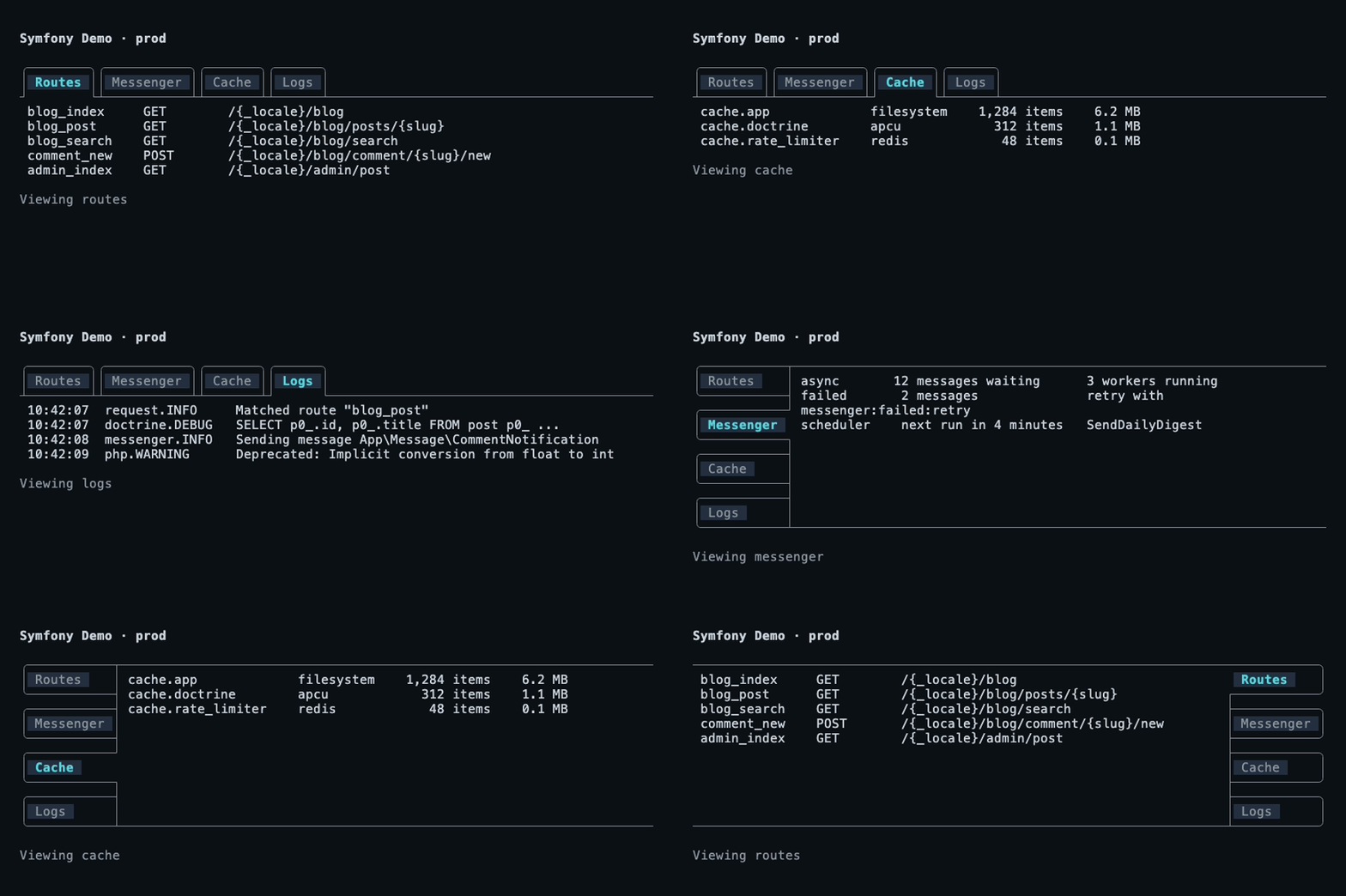
Tab headers are displayed above the contents by default, but you can place them on any of the four sides:
1
2
3
4
use Symfony\Component\Tui\Widget\TabPosition;

// other values: TabPosition::Top, TabPosition::Bottom, TabPosition::Right
$tabs->setPosition(TabPosition::Left);
A Symfony Tui application switching between four tabs and moving the tab headers to the left, bottom and right sides:
Collapsible Widget
Dense screens are easier to read when the details are hidden until you need them.
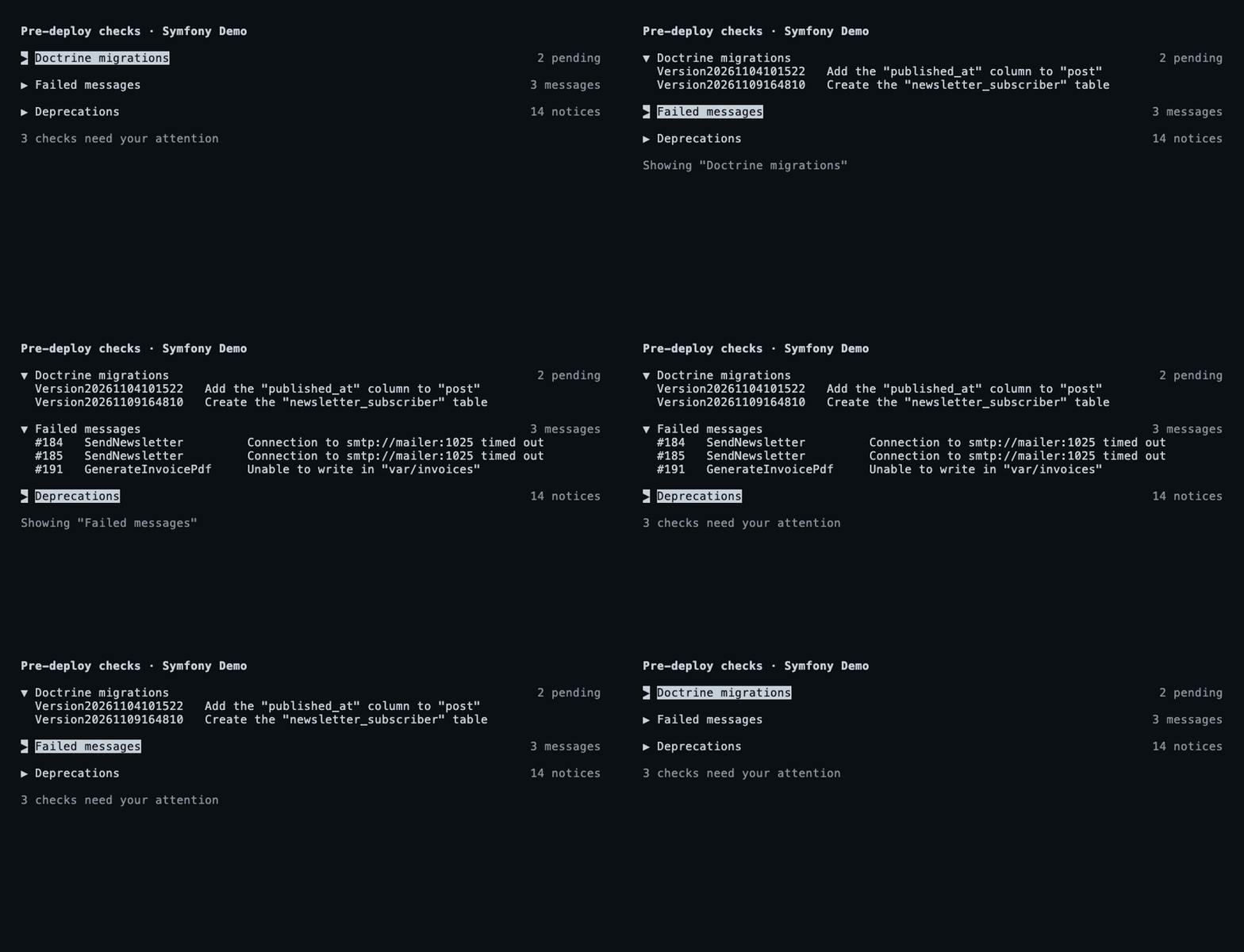
The new CollapsibleWidget is the terminal version of the HTML <details>
and <summary> elements: a summary line that is always visible and a content
widget that is only displayed while the widget is expanded:
1
2
3
4
5
6
7
8
9
10
11
12
13
14
15
16
17
use Symfony\Component\Tui\Event\ExpandEvent;
use Symfony\Component\Tui\Widget\CollapsibleWidget;
use Symfony\Component\Tui\Widget\TextWidget;

$migrations = new CollapsibleWidget(
    'Doctrine migrations',
    new TextWidget($pendingMigrations),
    // optional text displayed at the end of the summary line
    description: '2 pending',
);

$migrations->on(ExpandEvent::class, function () use ($status): void {
    $status->setText('Showing "Doctrine migrations"');
});

$tui->add($migrations);
$tui->setFocus($migrations);
Users toggle the widget with Enter or Space and the right and left arrow
keys expand and collapse it. Your code can do the same with the expand(),
collapse() and toggle() methods:
Key Binding Widget
Keyboard-driven applications are only as good as their shortcuts are easy to
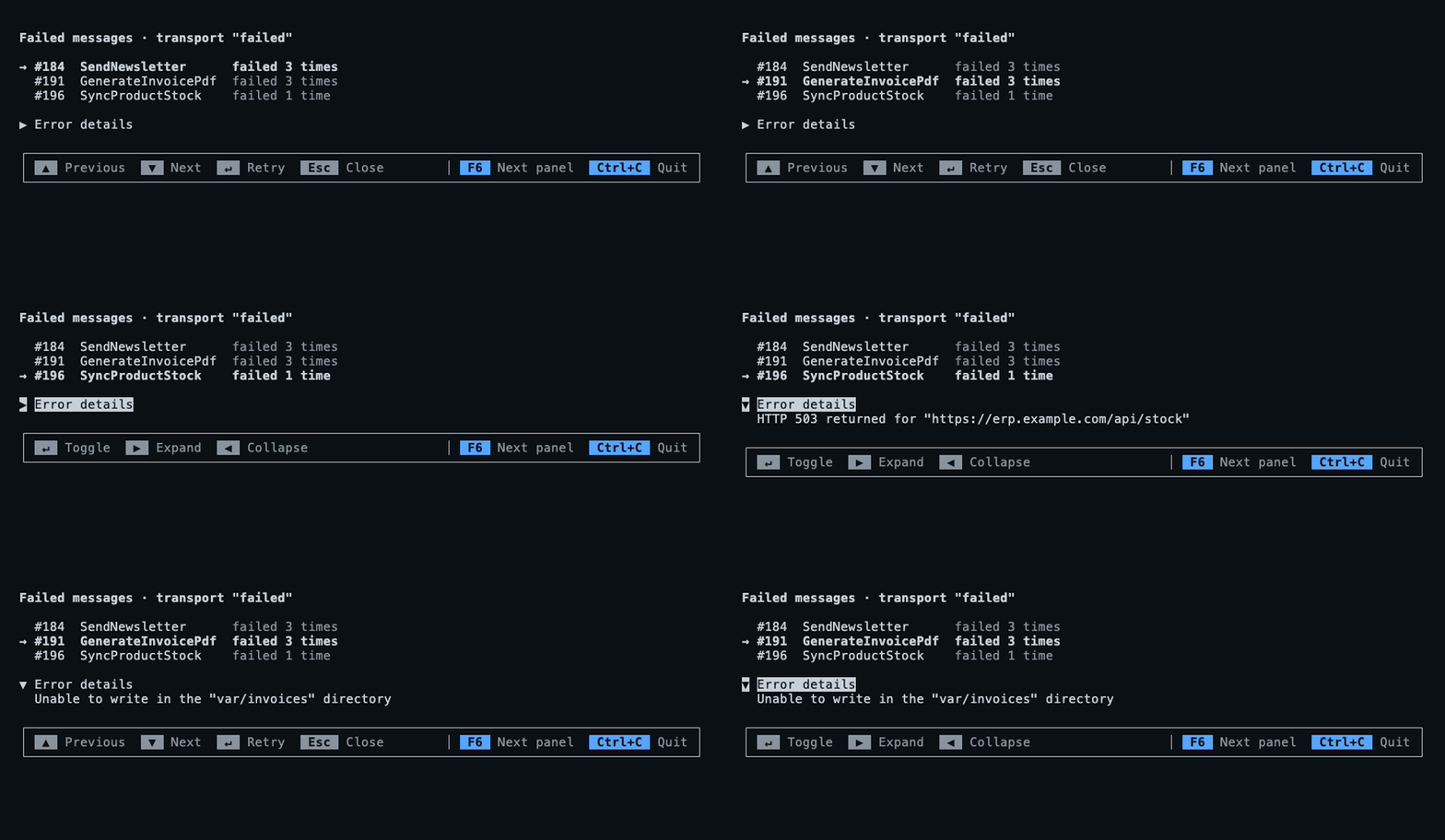
discover. The new KeyBindingWidget displays the shortcuts of the focused
widget, like the help bar found at the bottom of many terminal applications, and
updates itself when the focus moves to another widget:
1
2
3
4
5
6
7
8
9
10
11
12
13
14
15
16
17
18
19
20
21
use Symfony\Component\Tui\Input\Keybindings;
use Symfony\Component\Tui\Widget\KeyBindingWidget;

// $messages is a SelectListWidget; this is optional and
// changes the default labels displayed for its actions
$messages->setKeybindingLabels([
    'select_up' => 'Previous',
    'select_down' => 'Next',
    'select_confirm' => 'Retry',
    'select_cancel' => 'Close',
]);

$help = new KeyBindingWidget();
// shortcuts that work everywhere are displayed on the right
$help->setGlobalKeybindings(
    new Keybindings(['focus_next' => ['f6'], 'quit' => ['ctrl+c']]),
    ['focus_next' => 'Next panel', 'quit' => 'Quit'],
);

// add it once, usually as the last widget of the layout
$tui->add($help);
A Symfony Tui application whose bottom bar displays different keyboard shortcuts when the focus moves from a list to a collapsible panel:
Multiselect Lists
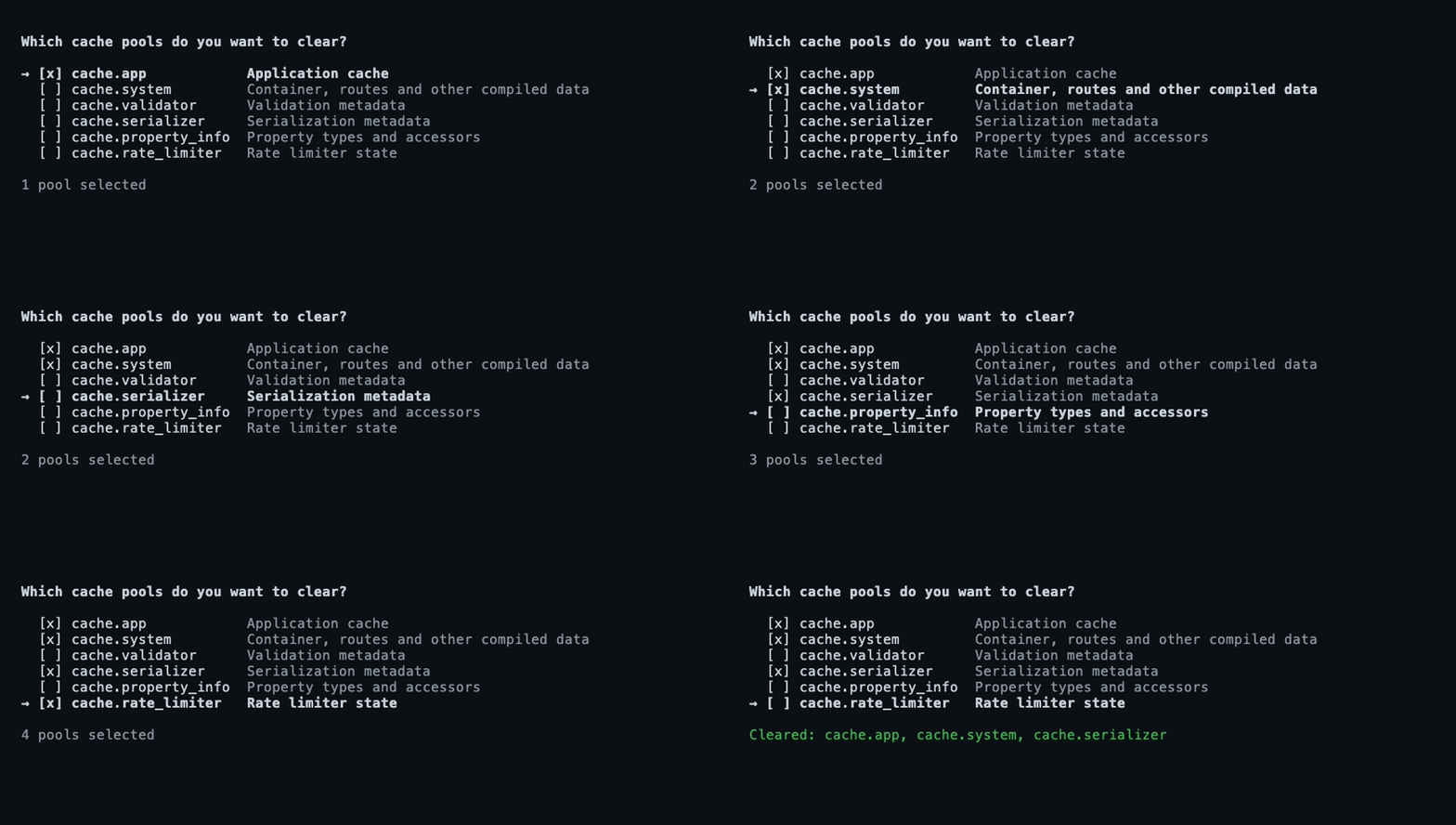
SelectListWidget displays a list of items and lets users pick one of them. In
Symfony 8.2, set its new multiselect argument to true to render a checkbox
next to each item, so users can check several of them with Space and confirm
them all with Enter:
1
2
3
4
5
6
7
8
9
10
11
12
13
14
15
16
17
18
19
use Symfony\Component\Tui\Event\MultiSelectEvent;
use Symfony\Component\Tui\Widget\SelectListWidget;

$pools = new SelectListWidget([
    // 'description' is optional; 'checked' checks the item by default
    [
        'value' => 'cache.app',
        'label' => 'cache.app',
        'description' => 'Application cache',
        'checked' => true,
    ],
    ['value' => 'cache.validator', 'label' => 'cache.validator'],
    ['value' => 'cache.serializer', 'label' => 'cache.serializer'],
    // ...
], multiselect: true);

$pools->onMultiSelect(function (MultiSelectEvent $event) use ($status): void {
    $status->setText('Cleared: '.implode(', ', $event->getValues()));
});
A Symfony Tui application with a list of cache pools where several of them are checked with the keyboard and then confirmed:
Custom Widgets That Contain Other Widgets
A custom widget that holds other widgets (a frame, a split panel, etc.) must add
each of them to the widget tree. In Symfony 8.1 that required calling methods
marked as internal. Symfony 8.2 adds the attachChild() and detachChild()
methods to do it:
1
2
3
4
5
6
7
8
9
10
11
12
13
14
15
16
17
18
19
20
21
22
23
24
25
26
use Symfony\Component\Tui\Render\RenderContext;
use Symfony\Component\Tui\Widget\AbstractWidget;

class FramedWidget extends AbstractWidget
{
    public function __construct(
        private AbstractWidget $content,
    ) {
        // it's safe to call this before the widget is added to the tree
        $this->attachChild($content);
    }

    public function setContent(AbstractWidget $content): static
    {
        $this->detachChild($this->content);
        $this->content = $content;
        $this->attachChild($content);

        return $this;
    }

    public function render(RenderContext $context): array
    {
        return $this->getContext()?->renderWidget($this->content, $context) ?? [];
    }
}
Post-Processing the Render of a Widget
Tui applies the padding, the border and the background of a widget after its
render() method returns. That's why widgets couldn't dim, mask or paint over
their whole box. In Symfony 8.2, widgets can override the new postRender()
method, which receives the finished lines of the widget and returns the lines
that are finally displayed.
Changing those lines is tricky because they mix text with ANSI escape sequences.
The new AnsiUtils::walkCells() method walks a rendered line and tells you the
column and the width of each of its parts, so you can change some cells while
keeping all the styles:
1
2
3
4
5
6
7
8
9
use Symfony\Component\Tui\Ansi\AnsiUtils;

// $line = "DATABASE_URL=\e[32mpostgresql://app:s3cr3t@127.0.0.1:5432/app\e[0m"
$maskedLine = '';
foreach (AnsiUtils::walkCells($line) as $token) {
    // escape sequences have a width of 0, so they are kept as they are
    $isSecret = $token['width'] > 0 && $token['col'] >= 13;
    $maskedLine .= $isSecret ? str_repeat('*', $token['width']) : $token['text'];
}
The new AnsiUtils::sliceToWidth() method complements it: it extracts a range
of columns from a line and always returns exactly the requested width, even when
a wide character (e.g. an emoji or a CJK character) crosses the limits of the range.
Persistent Widget Listeners

In Symfony 8.1, removing a widget from the widget tree also removed the listeners
registered on it. This was surprising when moving a widget to another container
or when hiding it for a while. In Symfony 8.2, listeners are kept until you remove
them with the new off() method:
1
2
3
4
5
6
7
8
9
10
11
12
use Symfony\Component\Tui\Event\SubmitEvent;

$search->on(SubmitEvent::class, $onSubmit);

$tui->remove($search);
// ...
$tui->add($search); // the $onSubmit listener is still registered

// removes this listener...
$search->off(SubmitEvent::class, $onSubmit);
// ... or all the listeners of this event
$search->off(SubmitEvent::class);
Locating Widgets on the Screen
A widget knows how to render its contents, but not where the layout places them
on the screen. That position is needed, for example, to find out which widget was
clicked. The new Tui::getWidgetRect() method returns the area where a widget
was drawn in the last render (or null if it wasn't drawn):
1
2
3
4
5
6
7
8
9
$rect = $tui->getWidgetRect($completions);

// $rect->row, $rect->col, $rect->columns and $rect->rows define the area;
// $row and $col are the 0-indexed screen coordinates of e.g. a mouse click
if ($rect?->contains($row, $col)) {
    ['row' => $clickedLine] = $rect->toRelative($row, $col);

    // ...
}
Paste Lifecycle Events
When pasting a large amount of text, the terminal sends it in several chunks. The
new PasteStartedEvent and PasteCompletedEvent tell your application when
the paste begins and when it ends, so it can, for example, display an indicator
or wait before processing the contents:
1
2
3
4
5
6
7
8
9
10
use Symfony\Component\Tui\Event\PasteCompletedEvent;
use Symfony\Component\Tui\Event\PasteStartedEvent;

$tui->addListener(function (PasteStartedEvent $event) use ($status): void {
    $status->setText('Pasting...');
});

$tui->addListener(function (PasteCompletedEvent $event) use ($status): void {
    $status->setText('');
});
Faster Rendering
Most frames of a terminal application are almost identical to the previous one: a log viewer appends a line, a chat adds a few words to the last message, etc. In Symfony 8.2, the renderer reuses the lines that didn't change between two frames instead of building and measuring them again. You don't have to change anything in your application to benefit from this, and the difference is most noticeable in screens with lots of lines where only a few of them change.
Super, Hyper and Meta Key Modifiers
Terminals that implement the Kitty keyboard protocol report three modifiers
in addition to shift, ctrl and alt. The most common one is super,
which is the Cmd key on macOS and the Windows key on other keyboards. In
Symfony 8.2 you can use super, hyper and meta in your keybindings:
1
2
3
4
5
6
7
8
use Symfony\Component\Tui\Input\Key;
use Symfony\Component\Tui\Input\Keybindings;

$keys = new Keybindings([
    // Key::super('k') is the same as 'super+k'
    'command_palette' => [Key::super('k'), 'ctrl+k'],
    'redo' => ['shift+super+z'],
]);
Key identifiers are now validated when creating the Keybindings object.
Typos and unknown names such as cmd+s, escpe or ctrl+pageup (the
right name is page_up) used to never match or, even worse, match the key
without its modifier. Now they throw an InvalidArgumentException.
Program Status Reporting
Long-running applications (builds, deployments, coding agents, etc.) alternate between working on their own, waiting for the user and finishing their work. Symfony 8.2 adds support for the Program Status Protocol (OSC 7501), which lets your application tell that to the terminal. Terminals and multiplexers that support the protocol decide how to display it (a tab indicator, a notification, etc.) and the rest of terminals ignore it:
1
2
3
4
5
6
7
8
9
10
11
12
13
14
15
16
17
18
19
20
21
use Symfony\Component\Tui\Terminal\ProgramStatus\ProgramBlockKind;
use Symfony\Component\Tui\Terminal\ProgramStatus\ProgramState;
use Symfony\Component\Tui\Terminal\ProgramStatus\ProgramStatus;

$terminal = $tui->getTerminal();

$terminal->setProgramStatus(
    new ProgramStatus(ProgramState::Working, 'Deploying v2.4.1', app: 'deploy')
);

// the program can't continue until the user approves the deployment
$terminal->setProgramStatus(new ProgramStatus(
    ProgramState::Blocked,
    'Approve the deploy to production?',
    app: 'deploy',
    kind: ProgramBlockKind::Permission,
));

$terminal->setProgramStatus(
    new ProgramStatus(ProgramState::Done, 'Deployed to 3 regions', app: 'deploy')
);