EasyAdmin Money Field
This field is used to represent the value of properties that store amounts of money.
In form pages (edit and new) it looks like this:
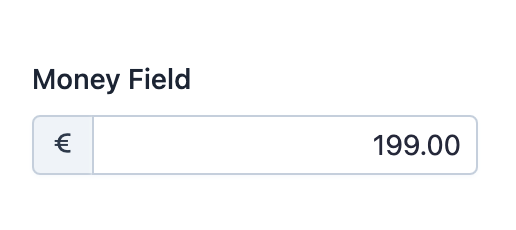
Basic Information
- PHP Class:
EasyCorp\Bundle \EasyAdminBundle \Field \MoneyField - Doctrine DBAL Type used to store this value:
decimal,floatorinteger - Symfony Form Type used to render the field: MoneyType (or
EaMoneyType, a custom form type created by EasyAdmin based on it, when using theuseMoneyObject()option) Rendered as:
1
<input type="number">
Options
setCurrency
The currency associated with the amount of money is needed to format the field
value in read-only pages (index and detail). If the currency is known and
the same for all values of the field, use this option (otherwise, use the
setCurrencyPropertyPath option).
The method argument must be a valid ISO 4217 standard currency code (the same codes used by CurrencyField):
1
2
// e.g. 'INR' = 'Indian Rupee'
yield MoneyField::new('...')->setCurrency('INR');
Every money field must define its currency with either this option or
setCurrencyPropertyPath(), and the given code must be known to ICU;
otherwise EasyAdmin throws an \InvalidArgumentException. Use the
CurrencyField::CURRENCY_NONE constant (the ISO 4217 'XXX' code) for
amounts that don't belong to any currency.
Note
In form pages, the currency symbol is displayed inside the form input using the same addons created with the prepend() and append() methods, so you can combine the currency symbol with your own addon contents.
setCurrencyPropertyPath
The currency associated with the amount of money is needed to format the field
value in read-only pages (index and detail). If the currency changes
for each field value, you'll probably store that currency code (following the
ISO 4217 standard) as a property of the entity.
Use this option to tell EasyAdmin which is the property that stores the currency code. The method argument is any valid Symfony PropertyAccess expression:
1
2
3
yield MoneyField::new('...')->setCurrencyPropertyPath('currency');
yield MoneyField::new('...')->setCurrencyPropertyPath('currencyCode');
yield MoneyField::new('...')->setCurrencyPropertyPath('currency.code');
setNumDecimals
By default, money amounts are displayed formatted with 2 decimal numbers. Use this option if you want to format values with a different number of decimals:
1
yield MoneyField::new('...')->setNumDecimals(0);setStoredAsCents
By default, EasyAdmin assumes that your database stores money amounts as cents.
For example, "5 euros" is stored as the integer 500 (5 x 100 cents) and
"349.99 euros" is stored as the integer 34999.
This is the recommended way to store money amounts in the database, even if it seems complicated at first. Doing this prevents rounding errors that commonly occur when storing money amounts using float or decimal numbers.
Tip
In Symfony/PHP applications you can use the Money PHP library to handle the conversion of money amounts from/into cents.
If you do not store money amounts in cents, set this option to false:
1
yield MoneyField::new('...')->setStoredAsCents(false);Note
When this option is enabled, the divisor is set at 100 automatically.
However, if you've defined your own custom divisor with the
setFormTypeOption('divisor', ...) method, the custom divisor will be used.
useMoneyObject
If your entity stores money amounts as Money\Money objects from the
Money PHP library, EasyAdmin can handle them directly. First, install the
library:
1
$ composer require moneyphp/moneyWhen the property value is already a Money object (e.g. on edit and
detail pages), EasyAdmin detects it automatically and no extra configuration
is needed. On new pages, where the value is null, you must enable this
option explicitly:
1
yield MoneyField::new('price')->useMoneyObject();The currency is read from the Money object by default, but you can override
it with setCurrency() or setCurrencyPropertyPath():
1
yield MoneyField::new('price')->useMoneyObject()->setCurrency('EUR');Note
Money objects always store amounts in the smallest currency unit, so
setStoredAsCents() has no effect when using this option. The divisor is
derived from the number of fraction digits that ICU defines for the
currency (e.g. 100 for EUR and USD, 1 for JPY and 1000 for BHD).