Testing
As we start to add more and more functionality to the application, it is probably the right time to talk about testing.
Fun fact: I found a bug while writing the tests in this chapter.
Symfony relies on PHPUnit for unit tests. Let's install it:
1
$ symfony composer req phpunit --devWriting Unit Tests
SpamChecker is the first class we are going to write tests for. Generate a unit test:
1
$ symfony console make:test TestCase SpamCheckerTestTesting the SpamChecker is a challenge as we certainly don't want to hit the OpenAI API: it would be slow, expensive, and the answers would not even be deterministic. We are going to replace the platform with a fake one.
Let's write a first test for when the model cannot be reached:
1
2
3
4
5
6
7
8
9
10
11
12
13
14
15
16
17
18
19
20
21
22
23
24
25
26
27
28
29
30
--- i/tests/SpamCheckerTest.php
+++ w/tests/SpamCheckerTest.php
@@ -2,12 +2,25 @@

 namespace App\Tests;

+use App\Entity\Comment;
+use App\SpamChecker;
 use PHPUnit\Framework\TestCase;
+use Symfony\AI\Agent\Agent;
+use Symfony\AI\Platform\Exception\RuntimeException;
+use Symfony\AI\Platform\Test\InMemoryPlatform;

 class SpamCheckerTest extends TestCase
 {
-    public function testSomething(): void
+    public function testSpamScoreWhenTheModelIsDown(): void
     {
-        $this->assertTrue(true);
+        $comment = new Comment();
+        $comment->setAuthor('Fabien');
+        $comment->setEmail('fabien@example.com');
+        $comment->setText('Such a nice conference!');
+
+        $platform = new InMemoryPlatform(fn () => throw new RuntimeException('The model is down.'));
+        $checker = new SpamChecker(new Agent($platform, 'gpt-5-mini'));
+
+        $this->assertSame(1, $checker->getSpamScore($comment, []));
     }
 }
The InMemoryPlatform class implements the platform interface without calling any external API. Given a callable, it can simulate any behavior, including failures. We wrap it in a real Agent so that the SpamChecker logic is tested for real.
When the model is down, comments must reach a human moderator: the expected score is 1.
Run the tests to check that they pass:
1
$ symfony php bin/phpunitLet's add tests for the happy path:
1
2
3
4
5
6
7
8
9
10
11
12
13
14
15
16
17
18
19
20
21
22
23
24
25
26
27
28
29
30
31
32
33
34
35
36
--- i/tests/SpamCheckerTest.php
+++ w/tests/SpamCheckerTest.php
@@ -4,6 +4,7 @@ namespace App\Tests;

 use App\Entity\Comment;
 use App\SpamChecker;
+use PHPUnit\Framework\Attributes\DataProvider;
 use PHPUnit\Framework\TestCase;
 use Symfony\AI\Agent\Agent;
 use Symfony\AI\Platform\Exception\RuntimeException;
@@ -23,4 +24,25 @@ class SpamCheckerTest extends TestCase

         $this->assertSame(1, $checker->getSpamScore($comment, []));
     }
+
+    #[DataProvider('provideComments')]
+    public function testSpamScore(int $expectedScore, string $answer): void
+    {
+        $comment = new Comment();
+        $comment->setAuthor('Fabien');
+        $comment->setEmail('fabien@example.com');
+        $comment->setText('Such a nice conference!');
+
+        $platform = new InMemoryPlatform($answer);
+        $checker = new SpamChecker(new Agent($platform, 'gpt-5-mini'));
+
+        $this->assertSame($expectedScore, $checker->getSpamScore($comment, []));
+    }
+
+    public static function provideComments(): iterable
+    {
+        yield 'blatant_spam' => [2, 'blatant spam'];
+        yield 'maybe_spam' => [1, 'Maybe spam.'];
+        yield 'ham' => [0, 'ham'];
+    }
 }
PHPUnit data providers allow us to reuse the same test logic for several test cases.
Writing Functional Tests for Controllers
Testing controllers is a bit different than testing a "regular" PHP class as we want to run them in the context of an HTTP request.
Create a functional test for the Conference controller:
1
2
3
4
5
6
7
8
9
10
11
12
13
14
15
namespace App\Tests\Controller;

use Symfony\Bundle\FrameworkBundle\Test\WebTestCase;

class ConferenceControllerTest extends WebTestCase
{
    public function testIndex(): void
    {
        $client = static::createClient();
        $client->request('GET', '/');

        $this->assertResponseIsSuccessful();
        $this->assertSelectorTextContains('h2', 'Give your feedback');
    }
}
Using Symfony instead of PHPUnit\Framework\TestCase as a base class for our tests gives us a nice abstraction for functional tests.
The $client variable simulates a browser. Instead of making HTTP calls to the server though, it calls the Symfony application directly. This strategy has several benefits: it is much faster than having round-trips between the client and the server, but it also allows the tests to introspect the state of the services after each HTTP request.
This first test checks that the homepage returns a 200 HTTP response.
Assertions such as assertResponseIsSuccessful are added on top of PHPUnit to ease your work. There are many such assertions defined by Symfony.
Tip
We have used / for the URL instead of generating it via the router. This is done on purpose as testing end-user URLs is part of what we want to test. If you change the route path, tests will break as a nice reminder that you should probably redirect the old URL to the new one to be nice with search engines and websites that link back to your website.
Configuring the Test Environment
By default, PHPUnit tests are run in the test Symfony environment as defined in the PHPUnit configuration file:
1
2
3
4
5
6
7
8
<phpunit>
    <php>
        <ini name="error_reporting" value="-1" />
        <server name="APP_ENV" value="test" force="true" />
        <server name="SHELL_VERBOSITY" value="-1" />
        <server name="SYMFONY_PHPUNIT_REMOVE" value="" />
        <server name="SYMFONY_PHPUNIT_VERSION" value="8.5" />
        ...
To make tests work, we must set the OPENAI_API_KEY secret for this test environment:
1
$ symfony console secrets:set OPENAI_API_KEY --env=testWorking with a Test Database
As we have already seen, the Symfony CLI automatically exposes the DATABASE_URL environment variable. When APP_ENV is test, like set when running PHPUnit, the database name changes from app to app_test so that tests have their very own database:
1
2
3
4
5
when@test:
    doctrine:
        dbal:
            # "TEST_TOKEN" is typically set by ParaTest
            dbname_suffix: '_test%env(default::TEST_TOKEN)%'
This is very important as we will need some stable data to run our tests and we certainly don't want to override what we stored in the development database.
Before being able to run the test, we need to "initialize" the test database (create the database and migrate it):
1
2
$ symfony console doctrine:database:create --env=test
$ symfony console doctrine:migrations:migrate -n --env=test
Note
On Linux and similiar OSes, you can use APP_ENV=test instead of
--env=test:
1
$ APP_ENV=test symfony console doctrine:database:createIf you now run the tests, PHPUnit won't interact with your development database anymore. To only run the new tests, pass the path to their class path:
1
$ symfony php bin/phpunit tests/Controller/ConferenceControllerTest.phpTip
When a test fails, it might be useful to introspect the Response object. Access it via $client->getResponse() and echo it to see what it looks like.
Defining Factories
To be able to test the comment list, the pagination, and the form submission, we need to populate the database with some data. And to keep tests independent from each other, each test should create the exact data set it needs. Object factories are the perfect tool for the job.
Install Zenstruck Foundry:
1
$ symfony composer req foundry --devGenerate a factory for each entity the tests need:
1
$ symfony console make:factory Conference1
$ symfony console make:factory CommentA factory describes how to build a valid entity: a default value is generated for each property thanks to the Faker library. Creating an object via a factory also persists it. Tune the conference defaults to be more realistic:
1
2
3
4
5
6
7
8
9
10
11
12
13
14
15
--- i/src/Factory/ConferenceFactory.php
+++ w/src/Factory/ConferenceFactory.php
@@ -34,9 +34,9 @@ final class ConferenceFactory extends PersistentObjectFactory
 protected function defaults(): array|callable
 {
     return [
-        'city' => self::faker()->text(255),
+        'city' => self::faker()->city(),
         'isInternational' => self::faker()->boolean(),
-        'slug' => self::faker()->text(255),
-        'year' => self::faker()->text(4),
+        'slug' => '-',
+        'year' => self::faker()->year(),
     ];
 }
Setting the slug to - lets the entity listener we wrote when adding slugs compute the real value: a conference created with city Amsterdam and year 2019 automatically gets the amsterdam-2019 slug.
Do the same for comments:
1
2
3
4
5
6
7
8
9
10
11
12
13
14
15
--- i/src/Factory/CommentFactory.php
+++ w/src/Factory/CommentFactory.php
@@ -34,10 +34,10 @@ final class CommentFactory extends PersistentObjectFactory
 protected function defaults(): array|callable
 {
     return [
-        'author' => self::faker()->text(255),
+        'author' => self::faker()->name(),
         'conference' => ConferenceFactory::new(),
         'createdAt' => \DateTimeImmutable::createFromMutable(self::faker()->dateTime()),
-        'email' => self::faker()->text(255),
+        'email' => self::faker()->email(),
         'text' => self::faker()->text(),
     ];
 }
Note the conference default: when a comment is created without an explicit conference, Foundry creates one on the fly.
Crawling a Website in Functional Tests
As we have seen, the HTTP client used in the tests simulates a browser, so we can navigate through the website as if we were using a headless browser.
Add a new test that clicks on a conference page from the homepage:
1
2
3
4
5
6
7
8
9
10
11
12
13
14
15
16
17
18
19
20
21
22
23
24
25
26
27
28
29
30
31
32
33
34
35
36
37
38
39
40
41
42
43
44
45
--- i/tests/Controller/ConferenceControllerTest.php
+++ w/tests/Controller/ConferenceControllerTest.php
@@ -2,10 +2,17 @@

 namespace App\Tests\Controller;

+use App\Factory\CommentFactory;
+use App\Factory\ConferenceFactory;
 use Symfony\Bundle\FrameworkBundle\Test\WebTestCase;
+use Zenstruck\Foundry\Test\Factories;
+use Zenstruck\Foundry\Test\ResetDatabase;

 class ConferenceControllerTest extends WebTestCase
 {
+    use Factories;
+    use ResetDatabase;
+
     public function testIndex(): void
     {
         $client = static::createClient();
@@ -14,4 +21,24 @@ class ConferenceControllerTest extends WebTestCase
         $this->assertResponseIsSuccessful();
         $this->assertSelectorTextContains('h2', 'Give your feedback');
     }
+
+    public function testConferencePage(): void
+    {
+        $client = static::createClient();
+
+        $amsterdam = ConferenceFactory::createOne(['city' => 'Amsterdam', 'year' => '2019', 'isInternational' => true]);
+        ConferenceFactory::createOne(['city' => 'Paris', 'year' => '2020', 'isInternational' => false]);
+        CommentFactory::createOne(['conference' => $amsterdam]);
+
+        $crawler = $client->request('GET', '/');
+
+        $this->assertCount(2, $crawler->filter('h4'));
+
+        $client->clickLink('View');
+
+        $this->assertPageTitleContains('Amsterdam');
+        $this->assertResponseIsSuccessful();
+        $this->assertSelectorTextContains('h2', 'Amsterdam 2019');
+        $this->assertSelectorExists('div:contains("There are 1 comments")');
+    }
 }
The Factories trait enables the factories in tests, and ResetDatabase resets the database at the beginning of each test run.
Let's describe what happens in this test in plain English:
- The test creates the exact data set it needs: two conferences and one comment, via the factories;
- Like the first test, we go to the homepage;
- The
request()method returns aCrawlerinstance that helps find elements on the page (like links, forms, or anything you can reach with CSS selectors or XPath); - Thanks to a CSS selector, we assert that we have two conferences listed on the homepage;
- We then click on the "View" link (as it cannot click on more than one link at a time, Symfony automatically chooses the first one it finds);
- We assert the page title, the response, and the page
<h2>to be sure we are on the right page (we could also have checked for the route that matches); - Finally, we assert that there is 1 comment on the page.
div:contains()is not a valid CSS selector, but Symfony has some nice additions, borrowed from jQuery.
Instead of clicking on text (i.e. View), we could have selected the link via a CSS selector as well:
1
$client->click($crawler->filter('h4 + p a')->link());Check that the new test is green:
1
$ symfony php bin/phpunit tests/Controller/ConferenceControllerTest.phpSubmitting a Form in a Functional Test
Do you want to get to the next level? Try adding a new comment with a photo on a conference from a test by simulating a form submission. That seems ambitious, doesn't it? Look at the needed code: not more complex than what we already wrote:
1
2
3
4
5
6
7
8
9
10
11
12
13
14
15
16
17
18
19
20
21
22
23
24
25
26
--- i/tests/Controller/ConferenceControllerTest.php
+++ w/tests/Controller/ConferenceControllerTest.php
@@ -41,4 +41,23 @@ class ConferenceControllerTest extends WebTestCase
         $this->assertSelectorTextContains('h2', 'Amsterdam 2019');
         $this->assertSelectorExists('div:contains("There are 1 comments")');
     }
+
+    public function testCommentSubmission(): void
+    {
+        $client = static::createClient();
+
+        $berlin = ConferenceFactory::createOne(['city' => 'Berlin', 'year' => '2021', 'isInternational' => false]);
+        CommentFactory::createOne(['conference' => $berlin]);
+
+        $client->request('GET', '/conference/berlin-2021');
+        $client->submitForm('Submit', [
+            'comment[author]' => 'Fabien',
+            'comment[text]' => 'Some feedback from an automated functional test',
+            'comment[email]' => 'me@automat.ed',
+            'comment[photo]' => dirname(__DIR__, 2).'/public/images/under-construction.gif',
+        ]);
+        $this->assertResponseRedirects();
+        $client->followRedirect();
+        $this->assertSelectorExists('div:contains("There are 2 comments")');
+    }
 }
To submit a form via submitForm(), find the input names thanks to the browser DevTools or via the Symfony Profiler Form panel. Note the clever re-use of the under construction image!
Run the tests again to check that everything is green:
1
$ symfony php bin/phpunit tests/Controller/ConferenceControllerTest.phpIf you want to check the result in a browser, stop the Web server and re-run it for the test environment:
1
2
$ symfony server:stop
$ APP_ENV=test symfony server:start -d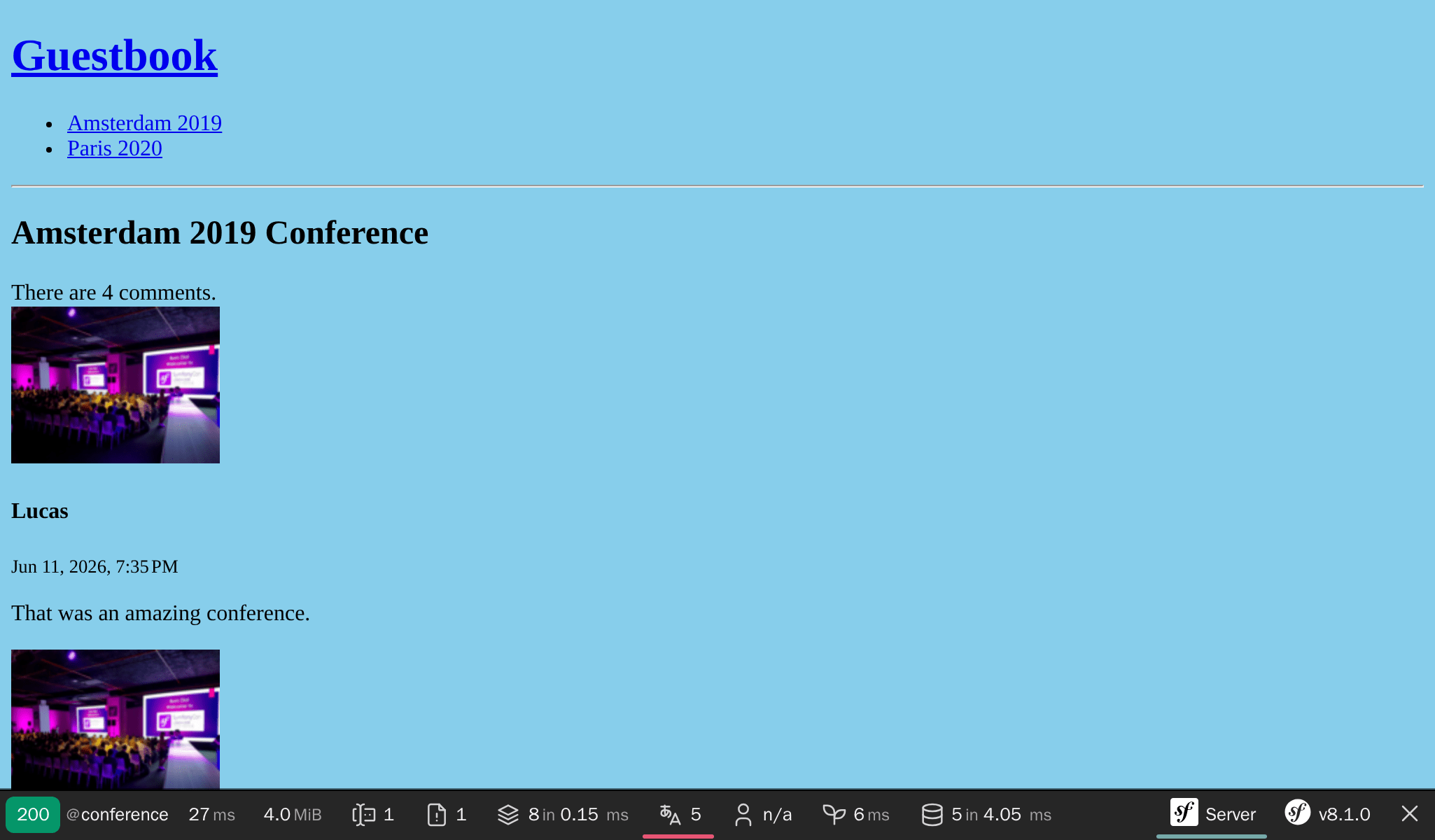
Running the Tests Again
If you run the tests a second time, they still pass: the ResetDatabase trait resets the database at the beginning of each test run, and each test creates the exact data set it needs. There is no shared state and no leftovers from a previous run:
1
$ symfony php bin/phpunit tests/Controller/ConferenceControllerTest.phpAutomating your Workflow with a Makefile
Having to remember a sequence of commands to run the tests is annoying. This should at least be documented. But documentation should be a last resort. Instead, what about automating day to day activities? That would serve as documentation, help discovery by other developers, and make developer lives easier and fast.
Using a Makefile is one way to automate commands:
1
2
3
4
5
6
7
8
SHELL := /bin/bash

tests:
	symfony console doctrine:database:drop --force --env=test || true
	symfony console doctrine:database:create --env=test
	symfony console doctrine:migrations:migrate -n --env=test
	symfony php bin/phpunit $(MAKECMDGOALS)
.PHONY: tests
Warning
In a Makefile rule, indentation must consist of a single tab character instead of spaces.
Note the -n flag on the Doctrine command; it is a global flag on Symfony commands that makes them non interactive.
Whenever you want to run the tests, use make tests:
1
$ make testsResetting the Database after each Test
Resetting the database after each test run is nice, but having truly independent tests is even better. We don't want one test to rely on the results of the previous ones. Changing the order of the tests should not change the outcome. As we're going to figure out now, this is not the case for the moment.
Move the testConferencePage test after the testCommentSubmission one:
1
2
3
4
5
6
7
8
9
10
11
12
13
14
15
16
17
18
19
20
21
22
23
24
25
26
27
28
29
30
31
32
33
34
35
36
37
38
39
40
41
42
43
44
45
46
47
48
49
50
51
52
53
54
55
--- i/tests/Controller/ConferenceControllerTest.php
+++ w/tests/Controller/ConferenceControllerTest.php
@@ -22,26 +22,6 @@ class ConferenceControllerTest extends WebTestCase
         $this->assertSelectorTextContains('h2', 'Give your feedback');
     }

-    public function testConferencePage(): void
-    {
-        $client = static::createClient();
-
-        $amsterdam = ConferenceFactory::createOne(['city' => 'Amsterdam', 'year' => '2019', 'isInternational' => true]);
-        ConferenceFactory::createOne(['city' => 'Paris', 'year' => '2020', 'isInternational' => false]);
-        CommentFactory::createOne(['conference' => $amsterdam]);
-
-        $crawler = $client->request('GET', '/');
-
-        $this->assertCount(2, $crawler->filter('h4'));
-
-        $client->clickLink('View');
-
-        $this->assertPageTitleContains('Amsterdam');
-        $this->assertResponseIsSuccessful();
-        $this->assertSelectorTextContains('h2', 'Amsterdam 2019');
-        $this->assertSelectorExists('div:contains("There are 1 comments")');
-    }
-
     public function testCommentSubmission(): void
     {
         $client = static::createClient();
@@ -41,5 +22,25 @@ class ConferenceControllerTest extends WebTestCase
         $this->assertResponseRedirects();
         $client->followRedirect();
         $this->assertSelectorExists('div:contains("There are 2 comments")');
     }
+
+    public function testConferencePage(): void
+    {
+        $client = static::createClient();
+
+        $amsterdam = ConferenceFactory::createOne(['city' => 'Amsterdam', 'year' => '2019', 'isInternational' => true]);
+        ConferenceFactory::createOne(['city' => 'Paris', 'year' => '2020', 'isInternational' => false]);
+        CommentFactory::createOne(['conference' => $amsterdam]);
+
+        $crawler = $client->request('GET', '/');
+
+        $this->assertCount(2, $crawler->filter('h4'));
+
+        $client->clickLink('View');
+
+        $this->assertPageTitleContains('Amsterdam');
+        $this->assertResponseIsSuccessful();
+        $this->assertSelectorTextContains('h2', 'Amsterdam 2019');
+        $this->assertSelectorExists('div:contains("There are 1 comments")');
+    }
 }
Tests now fail.
To reset the database between tests, install DoctrineTestBundle:
1
$ symfony composer req "dama/doctrine-test-bundle:^8" --devYou will need to confirm the execution of the recipe (as it is not an "officially" supported bundle):
1
2
3
4
5
6
7
8
9
10
11
Symfony operations: 1 recipe (a5c79a9ff21bc3ae26d9bb25f1262ed7)
  -  WARNING  dama/doctrine-test-bundle (>=4.0): From github.com/symfony/recipes-contrib:master
    The recipe for this package comes from the "contrib" repository, which is open to community contributions.
    Review the recipe at https://github.com/symfony/recipes-contrib/tree/master/dama/doctrine-test-bundle/4.0

    Do you want to execute this recipe?
    [y] Yes
    [n] No
    [a] Yes for all packages, only for the current installation session
    [p] Yes permanently, never ask again for this project
    (defaults to n): p
And done. Any changes done in tests are now automatically rolled-back at the end of each test.
Tests should be green again:
1
$ make testsUsing a real Browser for Functional Tests
Functional tests use a special browser that calls the Symfony layer directly. But you can also use a real browser and the real HTTP layer thanks to Symfony Panther:
1
$ symfony composer req panther --devYou can then write tests that use a real Google Chrome browser with the following changes:
1
2
3
4
5
6
7
8
9
10
11
12
13
14
15
16
17
18
19
--- i/tests/Controller/ConferenceControllerTest.php
+++ w/tests/Controller/ConferenceControllerTest.php
@@ -2,13 +2,13 @@

 namespace App\Tests\Controller;

-use Symfony\Bundle\FrameworkBundle\Test\WebTestCase;
+use Symfony\Component\Panther\PantherTestCase;

-class ConferenceControllerTest extends WebTestCase
+class ConferenceControllerTest extends PantherTestCase
 {
     public function testIndex(): void
     {
-        $client = static::createClient();
+        $client = static::createPantherClient(['external_base_uri' => rtrim($_SERVER['SYMFONY_PROJECT_DEFAULT_ROUTE_URL'], '/')]);
         $client->request('GET', '/');

         $this->assertResponseIsSuccessful();
The SYMFONY_PROJECT_DEFAULT_ROUTE_URL environment variable contains the URL of the local web server.
Choosing the Right Test Type
We have created three different types of tests so far. While we have only used the maker bundle to generate the unit test class, we could have used it to generate the other test classes as well:
1
2
3
$ symfony console make:test WebTestCase Controller\\ConferenceController

$ symfony console make:test PantherTestCase Controller\\ConferenceController
The maker bundle supports generating the following types of tests depending on how you want to test your application:
TestCase: Basic PHPUnit tests;KernelTestCase: Basic tests that have access to Symfony services;WebTestCase: To run browser-like scenarios, but that don't execute JavaScript code;ApiTestCase: To run API-oriented scenarios;PantherTestCase: To run e2e scenarios, using a real-browser or HTTP client and a real web server.
Running Black Box Functional Tests with Blackfire
Another way to run functional tests is to use the Blackfire player. In addition to what you can do with functional tests, it can also perform performance tests.
Read the Performance step to learn more.