Notificando por todos los medios
La aplicación Libro de visitas recoge comentarios sobre las conferencias. Pero no somos muy buenos dando feedback a nuestros usuarios.
Como los comentarios son moderados, probablemente no entienden por qué sus comentarios no se publican instantáneamente. Incluso podrían volver a enviarlos pensando que había algunos problemas técnicos. Darles feedback después de publicar un comentario sería fantástico.
De igual forma, probablemente deberíamos avisarles cuando su comentario se publique. Pedimos su correo electrónico, así que será mejor que lo usemos.
Hay muchas maneras de notificar a los usuarios. El correo electrónico es el primer medio en el que puedes pensar, pero notificar directamente en la aplicación web es otro. Incluso podríamos pensar en enviar mensajes SMS, publicar un mensaje en Slack o Telegram. Hay muchas opciones.
El componente Symfony Notifier implementa muchas estrategias de notificación.
Enviando notificaciones de aplicación web en el navegador
Como primer paso, notifiquemos a los usuarios que los comentarios son moderados directamente en el navegador después de su envío:
1
2
3
4
5
6
7
8
9
10
11
12
13
14
15
16
17
18
19
20
21
22
23
24
25
26
27
28
29
30
31
32
33
34
--- i/src/Controller/ConferenceController.php
+++ w/src/Controller/ConferenceController.php
@@ -16,6 +16,8 @@ use Symfony\Component\HttpFoundation\Response;
 use Symfony\Component\HttpKernel\Attribute\MapQueryParameter;
 use Symfony\Component\HttpKernel\Attribute\RateLimit;
 use Symfony\Component\Messenger\MessageBusInterface;
+use Symfony\Component\Notifier\Notification\Notification;
+use Symfony\Component\Notifier\NotifierInterface;
 use Symfony\Component\Routing\Attribute\Route;

 final class ConferenceController extends AbstractController
@@ -45,7 +47,8 @@ final class ConferenceController extends AbstractController
         Request $request,
         Conference $conference,
         CommentRepository $commentRepository,
+        NotifierInterface $notifier,
         #[Autowire('%photo_dir%')] string $photoDir,
         #[MapQueryParameter(options: ['min_range' => 0])] int $offset = 0,
     ): Response {
         $comment = new Comment();
@@ -69,8 +72,14 @@ final class ConferenceController extends AbstractController
             ];
             $this->bus->dispatch(new CommentMessage($comment->getId(), $context));

+            $notifier->send(new Notification('Thank you for the feedback; your comment will be posted after moderation.', ['browser']));
+
             return $this->redirectToRoute('conference', ['slug' => $conference->getSlug()]);
         }

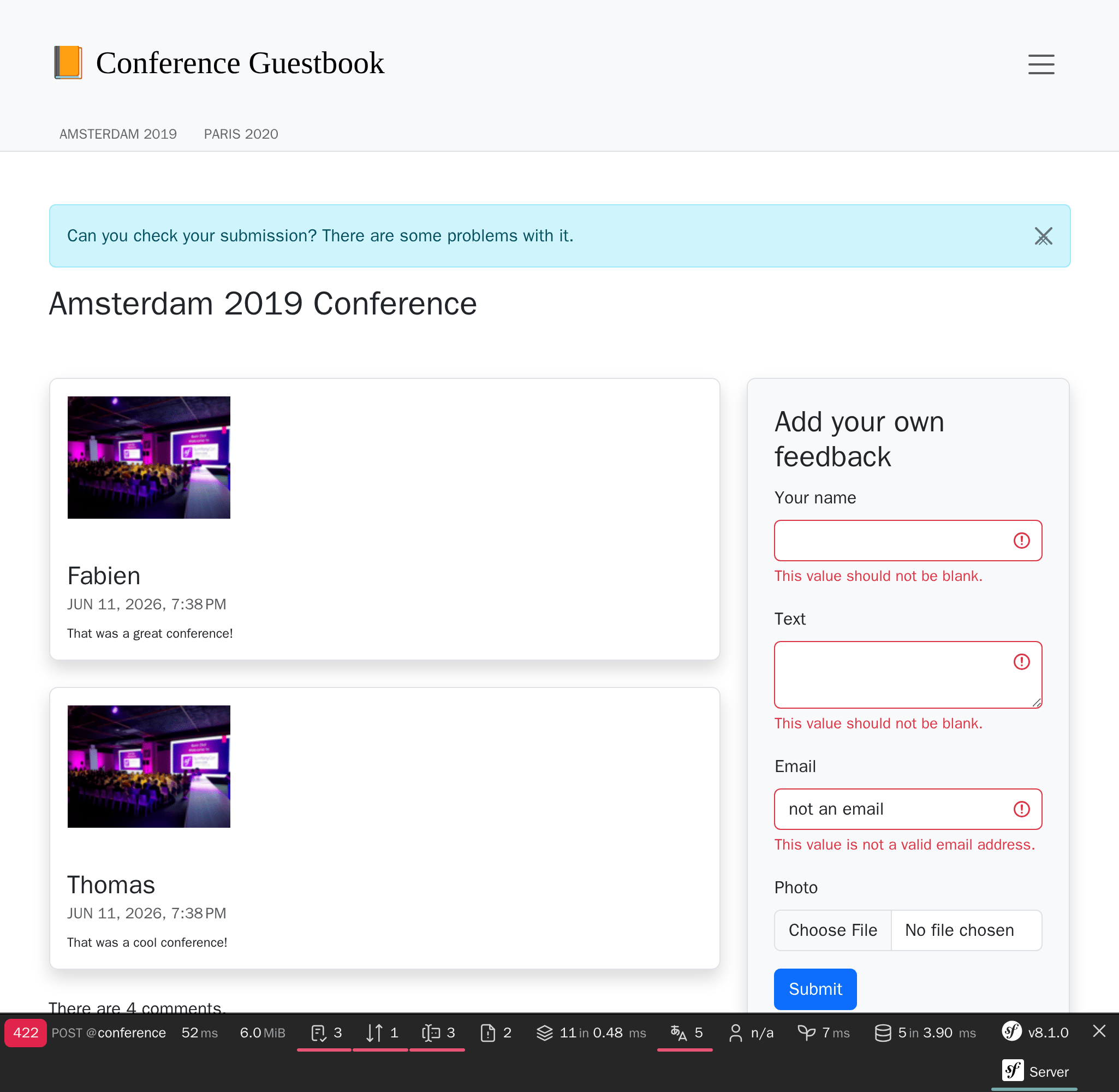
+        if ($form->isSubmitted()) {
+            $notifier->send(new Notification('Can you check your submission? There are some problems with it.', ['browser']));
+        }
+
         $paginator = $commentRepository->getCommentPaginator($conference, $offset);
El notificador envía una notificación a los destinatarios a través de un canal .
Una notificación tiene un asunto, un contenido opcional y una importancia.
Una notificación se envía en uno o varios canales dependiendo de su importancia. Puedes enviar, por ejemplo, notificaciones urgentes por SMS y periódicas por correo electrónico.
Para las notificaciones del navegador, no tenemos destinatarios.
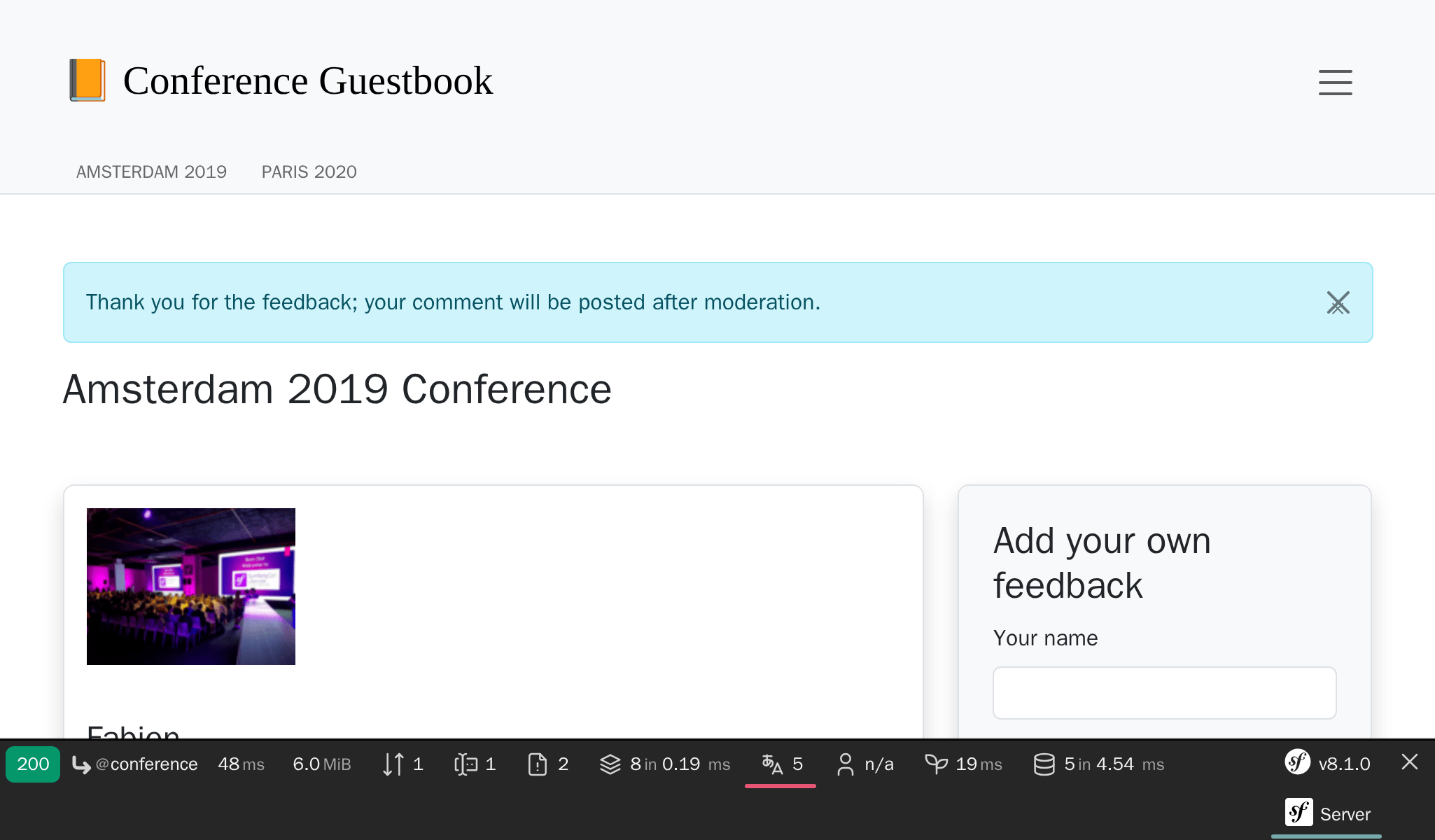
La notificación del navegador utiliza mensajes flash a través de la sección de notificación. Necesitamos mostrarlas actualizando la plantilla de la conferencia:
1
2
3
4
5
6
7
8
9
10
11
12
13
14
15
16
--- i/templates/conference/show.html.twig
+++ w/templates/conference/show.html.twig
@@ -3,6 +3,13 @@
{% block title %}Conference Guestbook - {{ conference }}{% endblock %}
{% block body %}
+ {% for message in app.flashes('notification') %}
+ <div class="alert alert-info alert-dismissible fade show">
+ {{ message }}
+ <button type="button" class="btn-close" data-bs-dismiss="alert" aria-label="Close"><span aria-hidden="true">×</span></button>
+ </div>
+ {% endfor %}
+
<h2 class="mb-5">
{{ conference }} Conference
</h2>Ahora se notificará a los usuarios que su envío ha sido moderado:
Como bonus adicional, tenemos una notificación en la parte superior del sitio web si existe un error en el formulario:
Tip
Los mensajes Flash utilizan el sistema de sesiones HTTP como medio de almacenamiento. La principal consecuencia es que la caché HTTP está deshabilitada, ya que el sistema de sesión debe iniciarse para comprobar si hay mensajes.
Esta es la razón por la que hemos añadido el fragmento de los mensajes flash en la plantilla show.html.twig y no en la base, ya que habríamos perdido la caché HTTP de la página de inicio.
Notificando a los administradores por correo electrónico
En lugar de enviar un correo electrónico a través de MailerInterface para notificar al administrador que se acaba de publicar un comentario, modifica el código para utilizar el componente Notifier en el manejador de mensajes:
1
2
3
4
5
6
7
8
9
10
11
12
13
14
15
16
17
18
19
20
21
22
23
24
25
26
27
28
29
30
31
32
33
34
35
36
37
38
39
40
41
42
43
44
45
--- i/src/MessageHandler/CommentMessageHandler.php
+++ w/src/MessageHandler/CommentMessageHandler.php
@@ -4,15 +4,15 @@ namespace App\MessageHandler;

 use App\ImageOptimizer;
 use App\Message\CommentMessage;
+use App\Notification\CommentReviewNotification;
 use App\Repository\CommentRepository;
 use App\SpamChecker;
 use Doctrine\ORM\EntityManagerInterface;
 use Psr\Log\LoggerInterface;
-use Symfony\Bridge\Twig\Mime\NotificationEmail;
 use Symfony\Component\DependencyInjection\Attribute\Autowire;
-use Symfony\Component\Mailer\MailerInterface;
 use Symfony\Component\Messenger\Attribute\AsMessageHandler;
 use Symfony\Component\Messenger\MessageBusInterface;
+use Symfony\Component\Notifier\NotifierInterface;
 use Symfony\Component\Workflow\WorkflowInterface;

 #[AsMessageHandler]
@@ -24,8 +24,7 @@ class CommentMessageHandler
         private CommentRepository $commentRepository,
         private MessageBusInterface $bus,
         private WorkflowInterface $commentStateMachine,
-        private MailerInterface $mailer,
-        #[Autowire('%admin_email%')] private string $adminEmail,
+        private NotifierInterface $notifier,
         private ImageOptimizer $imageOptimizer,
         #[Autowire('%photo_dir%')] private string $photoDir,
         private ?LoggerInterface $logger = null,
@@ -50,13 +49,7 @@ class CommentMessageHandler
             $this->entityManager->flush();
             $this->bus->dispatch($message);
         } elseif ($this->commentStateMachine->can($comment, 'publish') || $this->commentStateMachine->can($comment, 'publish_ham')) {
-            $this->mailer->send((new NotificationEmail())
-                ->subject('New comment posted')
-                ->htmlTemplate('emails/comment_notification.html.twig')
-                ->from($this->adminEmail)
-                ->to($this->adminEmail)
-                ->context(['comment' => $comment])
-            );
+            $this->notifier->send(new CommentReviewNotification($comment), ...$this->notifier->getAdminRecipients());
         } elseif ($this->commentStateMachine->can($comment, 'optimize')) {
             if ($comment->getPhotoFilename()) {
                 $this->imageOptimizer->resize($this->photoDir.'/'.$comment->getPhotoFilename());
El método getAdminRecipients() devuelve los destinatarios del administrador tal y como están configurados en la configuración del notificador; actualizalo ahora para añadir tu propia dirección de correo electrónico:
1
2
3
4
5
6
7
8
--- i/config/packages/notifier.yaml
+++ w/config/packages/notifier.yaml
@@ -9,4 +9,4 @@ framework:
             medium: ['email']
             low: ['email']
         admin_recipients:
-            - { email: admin@example.com }
+            - { email: "%env(string:default:default_admin_email:ADMIN_EMAIL)%" }
Ahora, crea la clase CommentReviewNotification:
1
2
3
4
5
6
7
8
9
10
11
12
13
14
15
16
17
18
19
20
21
22
23
24
25
26
27
namespace App\Notification;

use App\Entity\Comment;
use Symfony\Component\Notifier\Message\EmailMessage;
use Symfony\Component\Notifier\Notification\EmailNotificationInterface;
use Symfony\Component\Notifier\Notification\Notification;
use Symfony\Component\Notifier\Recipient\EmailRecipientInterface;

class CommentReviewNotification extends Notification implements EmailNotificationInterface
{
    public function __construct(
        private Comment $comment,
    ) {
        parent::__construct('New comment posted');
    }

    public function asEmailMessage(EmailRecipientInterface $recipient, string $transport = null): ?EmailMessage
    {
        $message = EmailMessage::fromNotification($this, $recipient, $transport);
        $message->getMessage()
            ->htmlTemplate('emails/comment_notification.html.twig')
            ->context(['comment' => $this->comment])
        ;

        return $message;
    }
}
El método asEmailMessage() de EmailNotificationInterface es opcional, pero permite personalizar el correo electrónico.
Una de las ventajas de utilizar el notificador en lugar del remitente para enviar mensajes de correo electrónico es que desvincula la notificación del "canal" utilizado para ello. Como puedes ver, nada dice explícitamente que la notificación debe enviarse por correo electrónico.
En su lugar, el canal se configura en config/packages/notifier.yaml en función de la importancia de la notificación (low, o baja, "por defecto"):
1
2
3
4
5
6
7
8
framework:
notifier:
    channel_policy:
        # use chat/slack, chat/telegram, sms/twilio or sms/nexmo
        urgent: ['email']
        high: ['email']
        medium: ['email']
        low: ['email']
Hasta ahora hemos hablado de los canales browser y email. Veamos otros más sofisticados.
Chateando con los administradores
Seamos sinceros, todos esperamos un feedback positivo. O al menos un feedback constructivo. Si alguien publica un comentario con palabras como "grandioso"("great") o "impresionante" ("awesome"), es posible que queramos aceptarlo más rápido que los demás.
Cuando se reciban esos mensajes, queremos que se nos avise en un sistema de mensajería instantánea como Slack o Telegram, además de por correo electrónico.
Instala el soporte de Slack para Symfony Notifier:
1
$ symfony composer req slack-notifierPara empezar, genera el DSN de Slack con un token de acceso de Slack y el identificador de canal de Slack donde deseas enviar los mensajes: slack://ACCESS_TOKEN@default?channel=CHANNEL.
Como el token de acceso es un dato sensible, guarda el DSN de Slack en el almacén secreto:
1
$ symfony console secrets:set SLACK_DSNHaz lo mismo para producción:
1
$ symfony console secrets:set SLACK_DSN --env=prodActualiza la clase Notification para enrutar los mensajes dependiendo del contenido del texto de los comentarios (un simple regex hará el trabajo):
1
2
3
4
5
6
7
8
9
10
11
12
13
14
15
16
17
18
19
20
21
22
23
24
25
26
--- i/src/Notification/CommentReviewNotification.php
+++ w/src/Notification/CommentReviewNotification.php
@@ -7,6 +7,7 @@ use Symfony\Component\Notifier\Message\EmailMessage;
 use Symfony\Component\Notifier\Notification\EmailNotificationInterface;
 use Symfony\Component\Notifier\Notification\Notification;
 use Symfony\Component\Notifier\Recipient\EmailRecipientInterface;
+use Symfony\Component\Notifier\Recipient\RecipientInterface;

 class CommentReviewNotification extends Notification implements EmailNotificationInterface
 {
@@ -26,4 +27,15 @@ class CommentReviewNotification extends Notification implements EmailNotificatio

         return $message;
     }
+
+    public function getChannels(RecipientInterface $recipient): array
+    {
+        if (preg_match('{\b(great|awesome)\b}i', $this->comment->getText())) {
+            return ['email', 'chat/slack'];
+        }
+
+        $this->importance(Notification::IMPORTANCE_LOW);
+
+        return ['email'];
+    }
 }
También hemos cambiado la importancia de los comentarios "normales", ya que modifican ligeramente el diseño del correo electrónico.
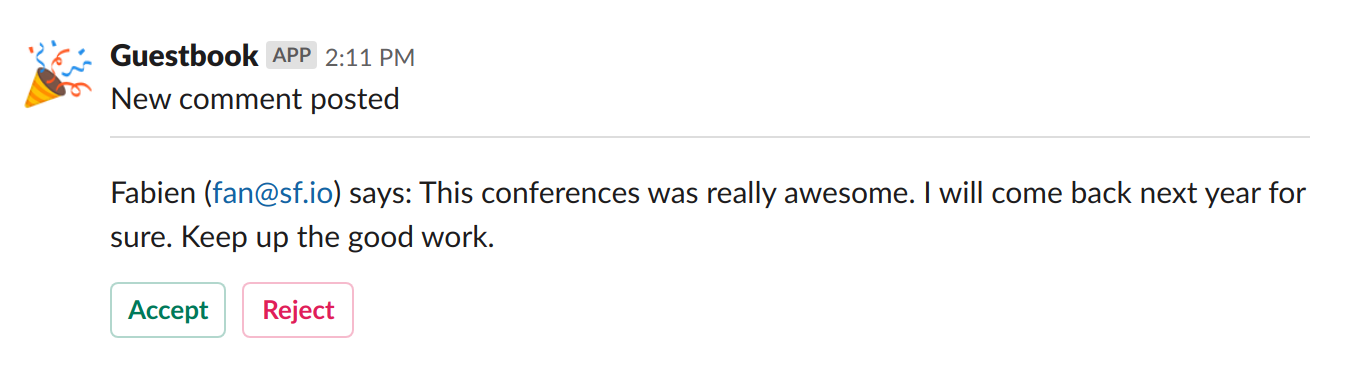
Y... ¡hecho! Envía un comentario con la palabra "awesome" (impresionante) en el texto, deberías recibir un mensaje por Slack.
En cuanto al correo electrónico, puedes implementar ChatNotificationInterface para modificar el aspecto predeterminado del mensaje de Slack:
1
2
3
4
5
6
7
8
9
10
11
12
13
14
15
16
17
18
19
20
21
22
23
24
25
26
27
28
29
30
31
32
33
34
35
36
37
38
39
40
41
42
43
44
45
46
47
48
49
50
51
--- i/src/Notification/CommentReviewNotification.php
+++ w/src/Notification/CommentReviewNotification.php
@@ -3,13 +3,18 @@
 namespace App\Notification;

 use App\Entity\Comment;
+use Symfony\Component\Notifier\Bridge\Slack\Block\SlackDividerBlock;
+use Symfony\Component\Notifier\Bridge\Slack\Block\SlackSectionBlock;
+use Symfony\Component\Notifier\Bridge\Slack\SlackOptions;
+use Symfony\Component\Notifier\Message\ChatMessage;
 use Symfony\Component\Notifier\Message\EmailMessage;
+use Symfony\Component\Notifier\Notification\ChatNotificationInterface;
 use Symfony\Component\Notifier\Notification\EmailNotificationInterface;
 use Symfony\Component\Notifier\Notification\Notification;
 use Symfony\Component\Notifier\Recipient\EmailRecipientInterface;
 use Symfony\Component\Notifier\Recipient\RecipientInterface;

-class CommentReviewNotification extends Notification implements EmailNotificationInterface
+class CommentReviewNotification extends Notification implements EmailNotificationInterface, ChatNotificationInterface
 {
     public function __construct(
         private Comment $comment,
@@ -28,6 +33,28 @@ class CommentReviewNotification extends Notification implements EmailNotificatio
         return $message;
     }

+    public function asChatMessage(RecipientInterface $recipient, string $transport = null): ?ChatMessage
+    {
+        if ('slack' !== $transport) {
+            return null;
+        }
+
+        $message = ChatMessage::fromNotification($this, $recipient, $transport);
+        $message->subject($this->getSubject());
+        $message->options((new SlackOptions())
+            ->iconEmoji('tada')
+            ->iconUrl('https://guestbook.example.com')
+            ->username('Guestbook')
+            ->block((new SlackSectionBlock())->text($this->getSubject()))
+            ->block(new SlackDividerBlock())
+            ->block((new SlackSectionBlock())
+                ->text(sprintf('%s (%s) says: %s', $this->comment->getAuthor(), $this->comment->getEmail(), $this->comment->getText()))
+            )
+        );
+
+        return $message;
+    }
+
     public function getChannels(RecipientInterface $recipient): array
     {
         if (preg_match('{\b(great|awesome)\b}i', $this->comment->getText())) {
Es mejor, pero vayamos un paso más allá. ¿No sería fantástico poder aceptar o rechazar un comentario directamente desde Slack?
Cambia la notificación para aceptar la URL de revisión y añade dos botones en el mensaje Slack:
1
2
3
4
5
6
7
8
9
10
11
12
13
14
15
16
17
18
19
20
21
22
23
24
25
26
27
28
29
--- i/src/Notification/CommentReviewNotification.php
+++ w/src/Notification/CommentReviewNotification.php
@@ -3,6 +3,7 @@
 namespace App\Notification;

 use App\Entity\Comment;
+use Symfony\Component\Notifier\Bridge\Slack\Block\SlackActionsBlock;
 use Symfony\Component\Notifier\Bridge\Slack\Block\SlackDividerBlock;
 use Symfony\Component\Notifier\Bridge\Slack\Block\SlackSectionBlock;
 use Symfony\Component\Notifier\Bridge\Slack\SlackOptions;
@@ -18,6 +19,7 @@ class CommentReviewNotification extends Notification implements EmailNotificatio
 {
     public function __construct(
         private Comment $comment,
+        private string $reviewUrl,
     ) {
         parent::__construct('New comment posted');
     }
@@ -50,6 +52,10 @@ class CommentReviewNotification extends Notification implements EmailNotificatio
             ->block((new SlackSectionBlock())
                 ->text(sprintf('%s (%s) says: %s', $this->comment->getAuthor(), $this->comment->getEmail(), $this->comment->getText()))
             )
+            ->block((new SlackActionsBlock())
+                ->button('Accept', $this->reviewUrl, 'primary')
+                ->button('Reject', $this->reviewUrl.'?reject=1', 'danger')
+            )
         );

         return $message;
Ahora se trata de rastrear los cambios hacia atrás. Primero, actualiza el manejador de mensajes para pasar la URL de revisión:
1
2
3
4
5
6
7
8
9
10
11
12
--- i/src/MessageHandler/CommentMessageHandler.php
+++ w/src/MessageHandler/CommentMessageHandler.php
@@ -49,7 +49,8 @@ class CommentMessageHandler
             $this->entityManager->flush();
             $this->bus->dispatch($message);
         } elseif ($this->commentStateMachine->can($comment, 'publish') || $this->commentStateMachine->can($comment, 'publish_ham')) {
-            $this->notifier->send(new CommentReviewNotification($comment), ...$this->notifier->getAdminRecipients());
+            $notification = new CommentReviewNotification($comment, $message->getReviewUrl());
+            $this->notifier->send($notification, ...$this->notifier->getAdminRecipients());
         } elseif ($this->commentStateMachine->can($comment, 'optimize')) {
             if ($comment->getPhotoFilename()) {
                 $this->imageOptimizer->resize($this->photoDir.'/'.$comment->getPhotoFilename());
Como puedes ver, la URL de revisión debería ser parte del mensaje de comentario, vamos a añadirla ahora:
1
2
3
4
5
6
7
8
9
10
11
12
13
14
15
16
17
18
19
--- i/src/Message/CommentMessage.php
+++ w/src/Message/CommentMessage.php
@@ -6,10 +6,16 @@ class CommentMessage
 {
     public function __construct(
         private int $id,
+        private string $reviewUrl,
         private array $context = [],
     ) {
     }

+    public function getReviewUrl(): string
+    {
+        return $this->reviewUrl;
+    }
+
     public function getId(): int
     {
         return $this->id;
Finalmente, actualiza los controladores para generar la URL de revisión y pásala al constructor del mensaje de comentario:
1
2
3
4
5
6
7
8
9
10
11
12
13
14
15
16
17
18
19
20
21
22
23
24
25
26
27
28
29
30
31
32
33
34
35
36
37
38
39
--- i/src/Controller/AdminController.php
+++ w/src/Controller/AdminController.php
@@ -12,6 +12,7 @@ use Symfony\Component\HttpKernel\HttpCache\StoreInterface;
 use Symfony\Component\HttpKernel\KernelInterface;
 use Symfony\Component\Messenger\MessageBusInterface;
 use Symfony\Component\Routing\Attribute\Route;
+use Symfony\Component\Routing\Generator\UrlGeneratorInterface;
 use Symfony\Component\Workflow\WorkflowInterface;
 use Twig\Environment;

@@ -42,7 +43,8 @@ class AdminController extends AbstractController
         $this->entityManager->flush();

         if ($accepted) {
-            $this->bus->dispatch(new CommentMessage($comment->getId()));
+            $reviewUrl = $this->generateUrl('review_comment', ['id' => $comment->getId()], UrlGeneratorInterface::ABSOLUTE_URL);
+            $this->bus->dispatch(new CommentMessage($comment->getId(), $reviewUrl));
         }

         return new Response($this->twig->render('admin/review.html.twig', [
--- i/src/Controller/ConferenceController.php
+++ w/src/Controller/ConferenceController.php
@@ -17,6 +17,7 @@ use Symfony\Component\Messenger\MessageBusInterface;
 use Symfony\Component\Notifier\Notification\Notification;
 use Symfony\Component\Notifier\NotifierInterface;
 use Symfony\Component\Routing\Attribute\Route;
+use Symfony\Component\Routing\Generator\UrlGeneratorInterface;

 final class ConferenceController extends AbstractController
 {
@@ -70,7 +71,8 @@ final class ConferenceController extends AbstractController
                 'referrer' => $request->headers->get('referer'),
                 'permalink' => $request->getUri(),
             ];
-            $this->bus->dispatch(new CommentMessage($comment->getId(), $context));
+            $reviewUrl = $this->generateUrl('review_comment', ['id' => $comment->getId()], UrlGeneratorInterface::ABSOLUTE_URL);
+            $this->bus->dispatch(new CommentMessage($comment->getId(), $reviewUrl, $context));

             $notifier->send(new Notification('Thank you for the feedback; your comment will be posted after moderation.', ['browser']));
El desacoplamiento de código significa cambios en más lugares, pero hace más fácil probar, razonar y reutilizar.
Inténtalo de nuevo, el mensaje debe estar bien ahora:
Volviéndonos asíncronos en todos los ámbitos
Las notificaciones se envían de forma asíncrona por defecto, como los correos electrónicos:
1
2
3
4
5
6
7
8
9
framework:
    messenger:
        routing:
            Symfony\Component\Mailer\Messenger\SendEmailMessage: async
            Symfony\Component\Notifier\Message\ChatMessage: async
            Symfony\Component\Notifier\Message\SmsMessage: async

            # Route your messages to the transports
            App\Message\CommentMessage: async
Si deshabilitáramos los mensajes asíncronos, tendríamos un pequeño problema. Por cada comentario, recibimos un correo electrónico y un mensaje de Slack. Si se produce un error en el mensaje de Slack (id de canal incorrecto, token incorrecto...), el mensaje se volverá a intentar enviar tres veces antes de ser descartado. Pero como el correo electrónico se envía primero, recibiremos 3 correos electrónicos y ningún mensaje de Slack.
Tan pronto como todo sea asíncrono, los mensajes se vuelven independientes. Los mensajes SMS ya están configurados como asíncronos en caso de que también quieras ser notificado en tu teléfono.
Notificando a los usuarios por correo electrónico
La última tarea es notificar a los usuarios cuando se apruebe su envío. ¿Qué te parece si dejamos que lo implementes tú mismo?