Formaat van afbeeldingen wijzigen
Op het ontwerp van de conferentiepagina's zijn de foto's beperkt tot een maximale grootte van 200 bij 150 pixels. Hoe optimaliseren en verkleinen we afbeeldingen als het geüploade origineel groter is dan de limieten?
Dat is een taak die perfect toegevoegd kan worden aan de comment workflow, waarschijnlijk vlak nadat de reactie gevalideerd is en vlak voordat deze gepubliceerd wordt.
Laten we een nieuwe ready state en een optimize transitie toevoegen:
1
2
3
4
5
6
7
8
9
10
11
12
13
14
15
16
17
18
19
20
21
22
23
24
25
26
27
28
29
--- i/config/packages/workflow.yaml
+++ w/config/packages/workflow.yaml
@@ -16,6 +16,7 @@ framework:
                 - potential_spam
                 - spam
                 - rejected
+                - ready
                 - published
             transitions:
                 accept:
@@ -29,13 +30,16 @@ framework:
                     to:   spam
                 publish:
                     from: potential_spam
-                    to:   published
+                    to:   ready
                 reject:
                     from: potential_spam
                     to:   rejected
                 publish_ham:
                     from: ham
-                    to:   published
+                    to:   ready
                 reject_ham:
                     from: ham
                     to:   rejected
+                optimize:
+                    from: ready
+                    to:   published
Genereer een visuele weergave van de nieuwe workflowconfiguratie om te valideren dat deze beschrijft wat we willen:
1
$ symfony console workflow:dump comment | dot -Tpng -o workflow.png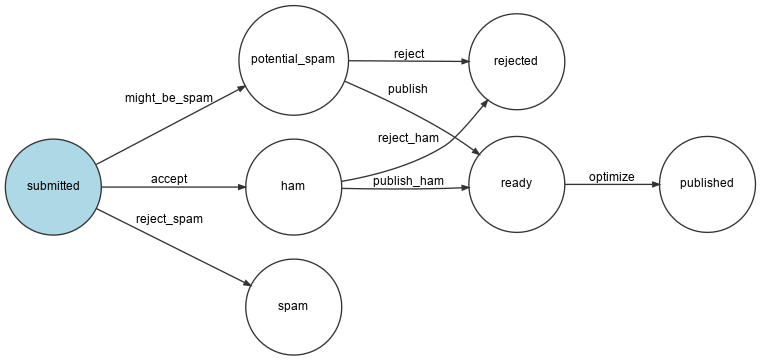
Afbeeldingen optimaliseren met Imagine
Optimalisatie van afbeeldingen wordt uitgevoerd door GD (controleer of de GD-extensie in je lokale PHP-installatie is ingeschakeld) en Imagine:
1
$ symfony composer req "imagine/imagine:^1.5"De grootte van een afbeelding kan aangepast worden via de volgende service class:
1
2
3
4
5
6
7
8
9
10
11
12
13
14
15
16
17
18
19
20
21
22
23
24
25
26
27
28
29
30
31
32
33
namespace App;

use Imagine\Gd\Imagine;
use Imagine\Image\Box;

class ImageOptimizer
{
    private const MAX_WIDTH = 200;
    private const MAX_HEIGHT = 150;

    private readonly Imagine $imagine;

    public function __construct()
    {
        $this->imagine = new Imagine();
    }

    public function resize(string $filename): void
    {
        [$iwidth, $iheight] = getimagesize($filename);
        $ratio = $iwidth / $iheight;
        $width = self::MAX_WIDTH;
        $height = self::MAX_HEIGHT;
        if ($width / $height > $ratio) {
            $width = $height * $ratio;
        } else {
            $height = $width / $ratio;
        }

        $photo = $this->imagine->open($filename);
        $photo->resize(new Box($width, $height))->save($filename);
    }
}
Na het optimaliseren van de foto, slaan we het nieuwe bestand op in plaats van het originele bestand. Misschien wil je het originele beeld wel ergens bewaren.
Een nieuwe stap in de workflow toevoegen
Wijzig de workflow om de nieuwe state af te handelen:
1
2
3
4
5
6
7
8
9
10
11
12
13
14
15
16
17
18
19
20
21
22
23
24
25
26
27
28
29
30
31
32
--- i/src/MessageHandler/CommentMessageHandler.php
+++ w/src/MessageHandler/CommentMessageHandler.php
@@ -2,6 +2,7 @@

 namespace App\MessageHandler;

+use App\ImageOptimizer;
 use App\Message\CommentMessage;
 use App\Repository\CommentRepository;
 use App\SpamChecker;
@@ -25,6 +26,8 @@ class CommentMessageHandler
         private WorkflowInterface $commentStateMachine,
         private MailerInterface $mailer,
         #[Autowire('%admin_email%')] private string $adminEmail,
+        private ImageOptimizer $imageOptimizer,
+        #[Autowire('%photo_dir%')] private string $photoDir,
         private ?LoggerInterface $logger = null,
     ) {
     }
@@ -54,6 +57,12 @@ class CommentMessageHandler
                 ->to($this->adminEmail)
                 ->context(['comment' => $comment])
             );
+        } elseif ($this->commentStateMachine->can($comment, 'optimize')) {
+            if ($comment->getPhotoFilename()) {
+                $this->imageOptimizer->resize($this->photoDir.'/'.$comment->getPhotoFilename());
+            }
+            $this->commentStateMachine->apply($comment, 'optimize');
+            $this->entityManager->flush();
         } elseif ($this->logger) {
             $this->logger->debug('Dropping comment message', ['comment' => $comment->getId(), 'state' => $comment->getState()]);
         }
Merk op dat $photoDir automatisch wordt geïnjecteerd omdat we in een vorige stap een container parameter hebben gedefinieerd voor deze variabelenaam:
1
2
parameters:
    photo_dir: "%kernel.project_dir%/public/uploads/photos"
Opslaan van geüploade gegevens in productie
We hebben al een speciale lezen-schrijven directory gedefinieerd voor geüploade bestanden in .upsun/config.yaml, maar de mount is lokaal aan de applicatiecontainer. Als we willen dat de webcontainer en de message consumer toegang krijgen tot dezelfde mount, moeten we een file service toevoegen:
1
2
3
4
5
6
7
8
9
10
--- i/.upsun/config.yaml
+++ w/.upsun/config.yaml
@@ -15,6 +15,9 @@ services:
                 type: string
                 path: config.vcl

+    files:
+        type: network-storage:2.0
+
 applications:
Gebruik het als foto-upload-directory:
1
2
3
4
5
6
7
8
9
10
11
--- i/.upsun/config.yaml
+++ w/.upsun/config.yaml
@@ -54,7 +54,7 @@ applications:
         mounts:
             "/var/cache": { source: instance, source_path: var/cache }
             "/var/share": { source: storage, source_path: var/share }
-            "/public/uploads": { source: storage, source_path: uploads }
+            "/public/uploads": { source: service, service: files, source_path: uploads }


         relationships:
Dit zou voldoende moeten zijn om de functie in productie te laten werken.