
A Symfony application is full of strings that mean something: route names,
service ids, template paths, translation keys, environment variables. But to
most editors, they mean nothing. Write redirectToRoute('order_confirmaton')
and nothing complains about the typo. PhpStorm users have been covered for
years by the excellent Symfony Plugin. In VS Code? You were on your own.
Not anymore. Today I'm releasing Symfony Language Tools, the official Symfony language server. It adds Symfony-aware completion, hover, navigation, references, rename support, diagnostics, quick fixes and code lenses to PHP, Twig and YAML files. It ships as a native VS Code extension and supports Neovim out of the box. It does not compete with your PHP language server (Intelephense, PHP Tools, you name it); it works alongside it, each one doing what it does best.
Native VS Code Integration
I wanted the installation story to be boring. Open the Extensions view and
search for "Symfony". The search returns quite a few extensions, so pick
the official one: Symfony Language Tools, published by symfony.
Select Install. That's it. The extension bundles the language server for
your platform; there is nothing else to download or configure.
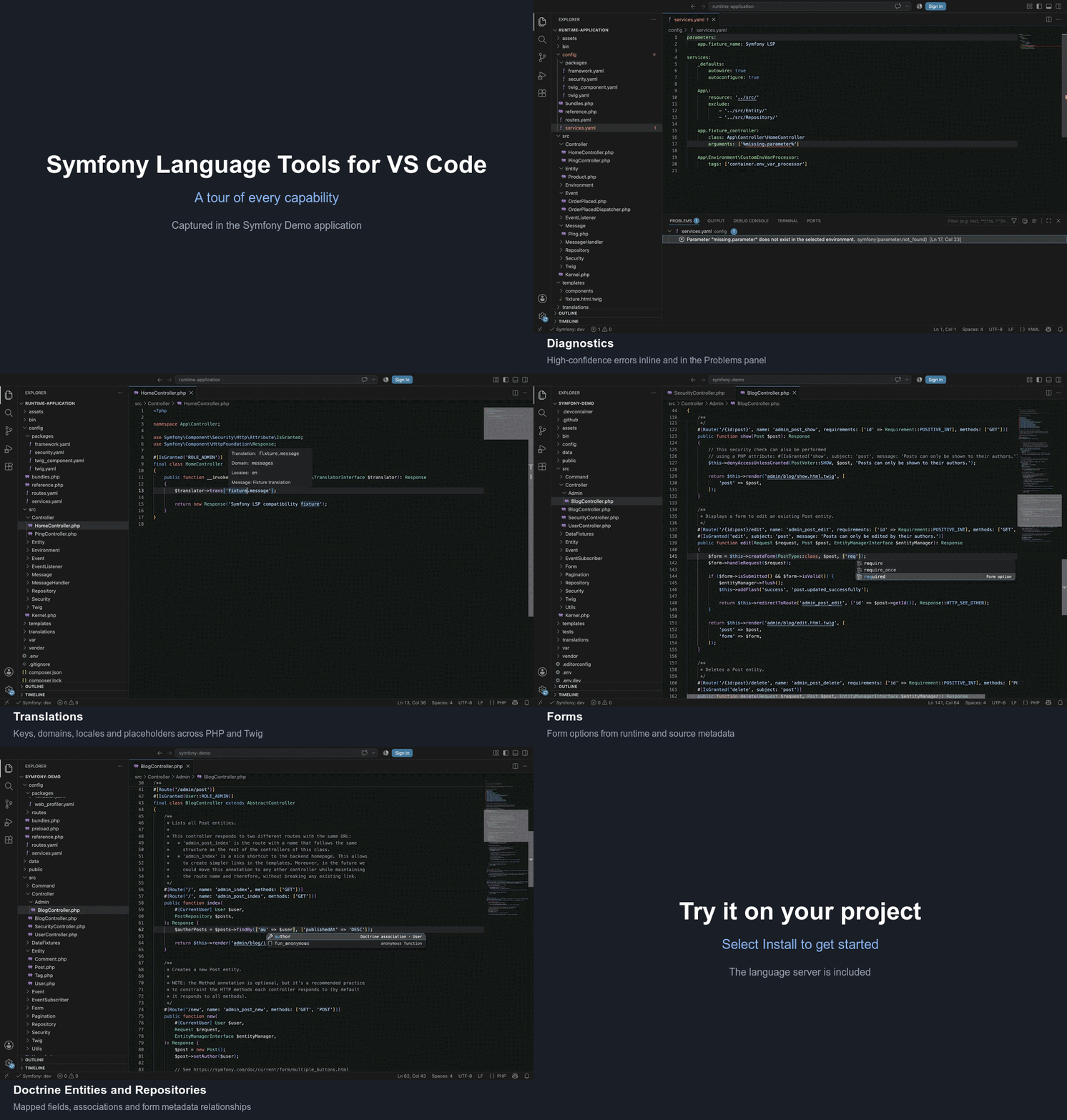
Open a Symfony application and your usual gestures, from Go to Definition to Rename, start working on Symfony values. Here is a tour, captured on the Symfony Demo application:
What It Understands
The short answer: the framework, end to end. Routing, dependency injection, Twig templates, translations, environment variables, bundle configuration, Messenger, events, Security, forms, validation, serializer metadata, AssetMapper, Stimulus, Live Components and Doctrine. The supported integrations page lists the exact capabilities for each of them.
I made an opinionated choice about accuracy. The server does not guess from your source files alone; in a trusted workspace, it boots your kernel in debug mode to read the compiled container, the effective router and other runtime metadata. And diagnostics are reported only when the server can prove a value is invalid: false positives are the fastest way to make you disable a tool, so there are none.
Other Editors
The server speaks the standard Language Server Protocol, so VS Code is not a
requirement. For instance, Neovim users can install the symfony-lsp server
and enable the bundled nvim-lspconfig configuration:
1
vim.lsp.enable('symfony_lsp')For any other LSP-capable editor, standalone archives for Linux, macOS and Windows are available on GitHub Releases. The symfony/language-tools repository has the editor guides, configuration and troubleshooting.
Written with AI
Most of the code has been written and reviewed by AI models, mainly Claude Fable 5 and GPT-5.6 Sol. I directed the work: the architecture, the scope of each feature and the final word on every change stayed with me.
AI-written does not mean untested. The project has an extensive test suite
and performance benchmarks, and we eat our own dog food: the test matrix
includes every *.symfony.com website, symfony.com itself included.
An Experimental Beta
A word of caution: this is a beta, and an experimental one. I'm releasing it early because real-world usage is what moves a beta forward. Give it a try on your application and give feedback on symfony/language-tools.
This is huuuuuge. Thanks a lot! Hopefully those Mason's requirements are fulfilled soon by the community to have it merged.
Can you publish it on Open VSX https://open-vsx.org/ ?