EasyAdmin Percent Field
This field is used to represent the value of properties that store percentages. For plain numbers use NumberField and for amounts of money use MoneyField.
In form pages (edit and new) it looks like this:
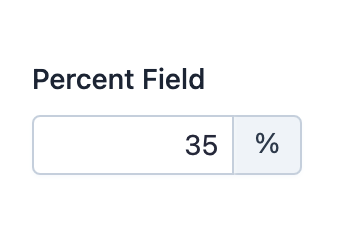
Basic Information
- PHP Class:
EasyCorp\Bundle \EasyAdminBundle \Field \PercentField - Doctrine DBAL Type used to store this value:
decimal,floatorinteger - Symfony Form Type used to render the field: PercentType
Rendered as:
1
<input type="text">
Options
setNumDecimals
By default, percentages are displayed without decimals. Use this option if you want to format values with a certain number of decimals:
1
2
// this would format 3 as 3.00 and 5.123 as 5.12
yield PercentField::new('...')->setNumDecimals(2);
setRoundingMode
By default, when some value must be rounded to reduce the number of decimals,
the field uses PHP \NumberFormatter::ROUND_HALFUP strategy. Use this option
to change the rounding strategy. The argument must be one of these constants of
the PHP NumberFormatter class: ROUND_DOWN, ROUND_FLOOR, ROUND_UP,
ROUND_CEILING, ROUND_HALFDOWN, ROUND_HALFEVEN and ROUND_HALFUP:
1
yield PercentField::new('...')->setRoundingMode(\NumberFormatter::ROUND_CEILING);setStoredAsFractional
By default, percentages are stored as fractional values from 0 to 1
(e.g. 15% is stored as 0.15 and 67.84% is stored as 0.6784). If you
prefer to store percentages as integer values from 0 to 100, set this
option to false:
1
yield PercentField::new('...')->setStoredAsFractional(false);Caution
If your percentages can have decimals, you must store them as fractional values, so don't disable this option.
Regardless of how you store these values, EasyAdmin always displays percentages
as values from 0 to 100 (e.g. even if you store 15% as 0.15 in the
database, forms and listings will always display 15%).
setSymbol
By default, values display a % next to them to make them easier to understand.
Use this option and pass false to not display any symbol or pass any other
string to use that as the symbol:
1
2
3
4
5
// this won't display any symbol
yield PercentField::new('...')->setSymbol(false);

// this will display the "per mille" (per thousand) symbol next to values
yield PercentField::new('...')->setSymbol('‰');
Note
In form pages, this symbol is displayed inside the form input using the same addons created with the prepend() and append() methods, so you can combine the symbol with your own addon contents.